


How to Manage DNS Settings for Your Domain
This article will guide you through managing DNS settings for domains registered with Valla Hub. The DNS (Domain Name System) settings allow you to manage your domain's records and direct traffic to your website or other services.
Accessing Your Domain List
- Log into your Valla Hub client area.
- In the main menu, hover over the Domains tab and select My Domains.
Alternatively, from your dashboard overview, you can view a summary of your active products, including the number of domains. Clicking on the Domains box will take you directly to your domain list.

Managing DNS Records
Once you’re in your domain list, the steps for managing DNS settings differ depending on whether you have only a domain or a hosting plan.
Option 1: If You Have Only a Domain
- From the My Domains page, locate the domain you want to manage.
- Click the 3 dots next to the domain and select Manage Domain.

- Scroll to the right to find the DNS Management area.

- In the DNS Management section, you can:
- Add new DNS records (A, CNAME, MX, etc.).
- Edit or delete existing records.
- Set priority for MX records.

After making any changes, click Save Changes to apply your updates.
Option 2: If You Have a Hosting Plan
- From the Service Overview page, click on Login to cPanel.

- In cPanel, navigate to the Domains section and select Zone Editor.

- Here, you can:
- Add new DNS records.
- Manage, Edit or delete existing records for the domain.


Make sure to save your changes, and note that updates can take up to 24-48 hours to propagate fully. You can use an online DNSChecker Tool to monitor the propagation of the DNS records.
Updating Nameservers
If you need to change your domain's nameservers:
- From the Manage Domain page, go to Nameservers.
- Enter the new nameservers provided by your hosting or DNS provider.
- Click Save Changes to update the nameservers.
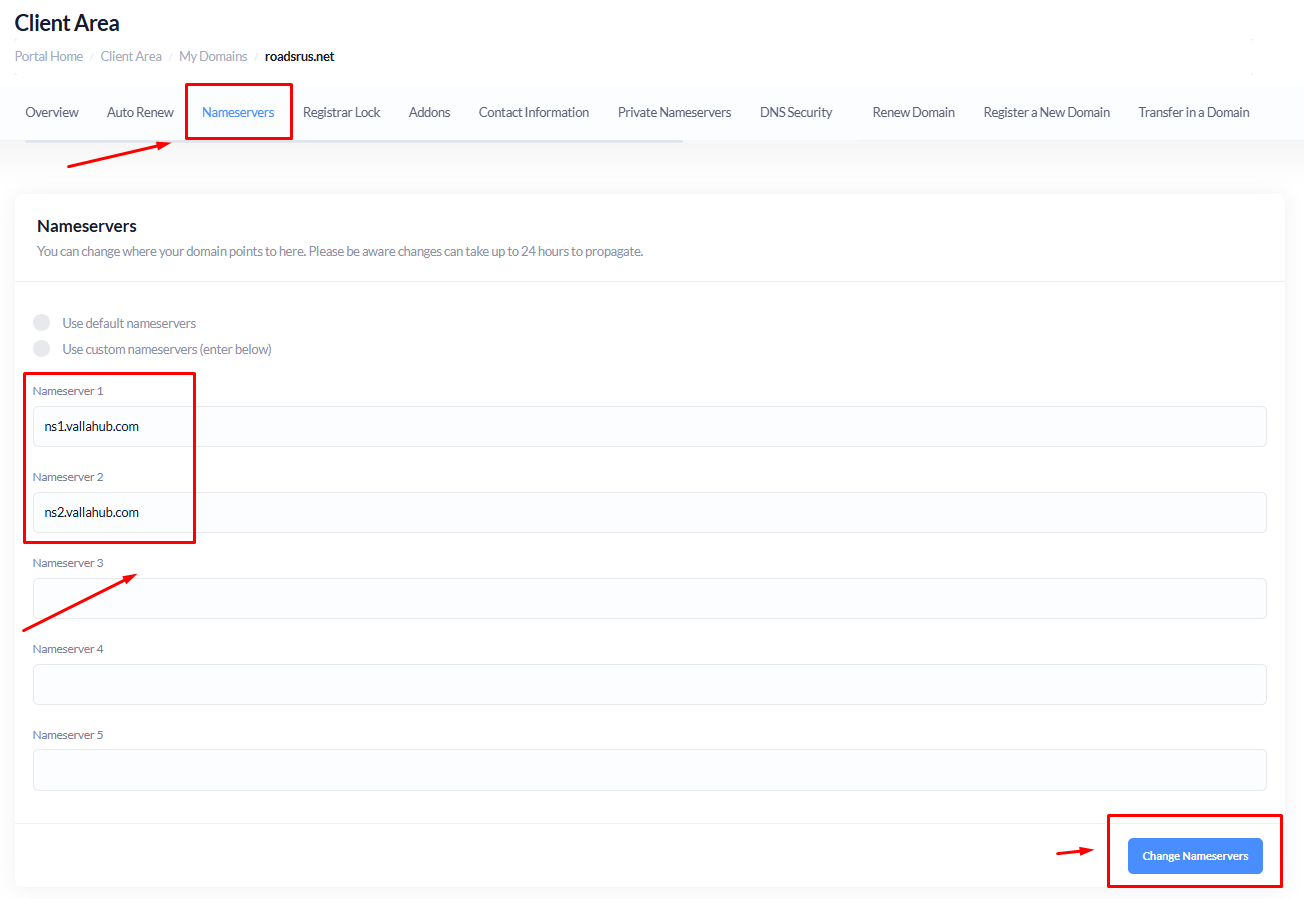
Note: DNS updates may take up to 24-48 hours to fully propagate.
Managing your DNS settings is essential for directing traffic and ensuring your domain functions correctly. With Valla Hub's easy-to-use interface, you can quickly update your DNS records and nameservers. If you need further assistance, don’t hesitate to reach out to our support team.