


How to Settle Invoices Easily
Valla Hub is committed to providing a smooth and straightforward payment process for our customers. This guide will walk you through accessing and paying your invoices, along with the supported payment options.
Accessing Your Invoices
If you have any unpaid invoices, you can quickly access and settle them through your Valla Hub dashboard.
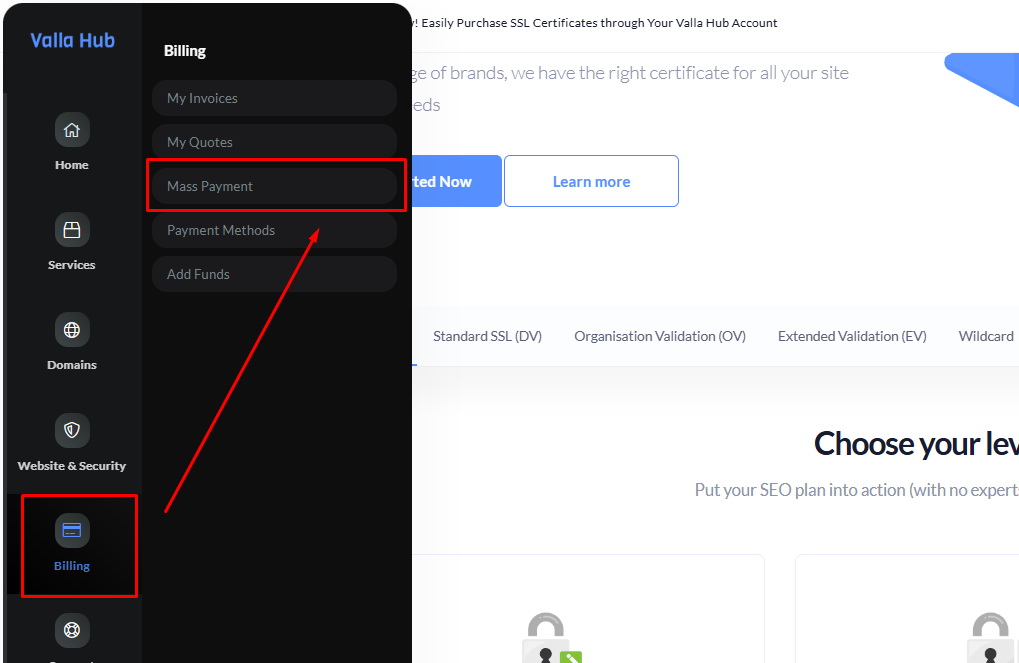
- In the left-hand navigation menu, hover to Billing.
- Choose Mass Payment to view a consolidated list of all your outstanding invoices.
- Simply select the invoice you want to pay, click on "Pay Now" then follow the on-screen instructions to complete your payment.
Supported Payment Methods
Valla Hub offers a range of payment options to meet the needs of our diverse customers. You can choose the method that works best for you during the checkout process or when paying an outstanding invoice.
We currently accept:
- Visa
- Mastercard
- Payoneer
- PayPal
- Discover
- RazorPay
Simply select your preferred payment method from the available options when prompted during the payment process.
With these easy steps and flexible payment options, settling invoices is simple and hassle-free. If you have any questions or issues, don’t hesitate to reach out to our support team for assistance.