


How to Manage Your Hosting Account and Access cPanel
Managing your hosting account at Valla Hub is simple, and cPanel makes it easy to control all aspects of your website. Here’s how you can access and manage your account efficiently:
Accessing cPanel from Your Dashboard

-
Log in to Your Valla Hub Dashboard
Once logged into your Valla Hub account, your dashboard will display an overview of your services and products. -
Locate Your Hosting Service
Under Services, you’ll see the hosting plan/s in your account. Look for the plan you want to manage. -
Log in to cPanel
On the right side of the hosting plan details, you’ll see a button labeled Log in to cPanel. Click that button to access cPanel without needing any additional logins!
Inside cPanel: What You Can Manage
Once inside cPanel, you have a full set of tools at your disposal to manage your hosting account.
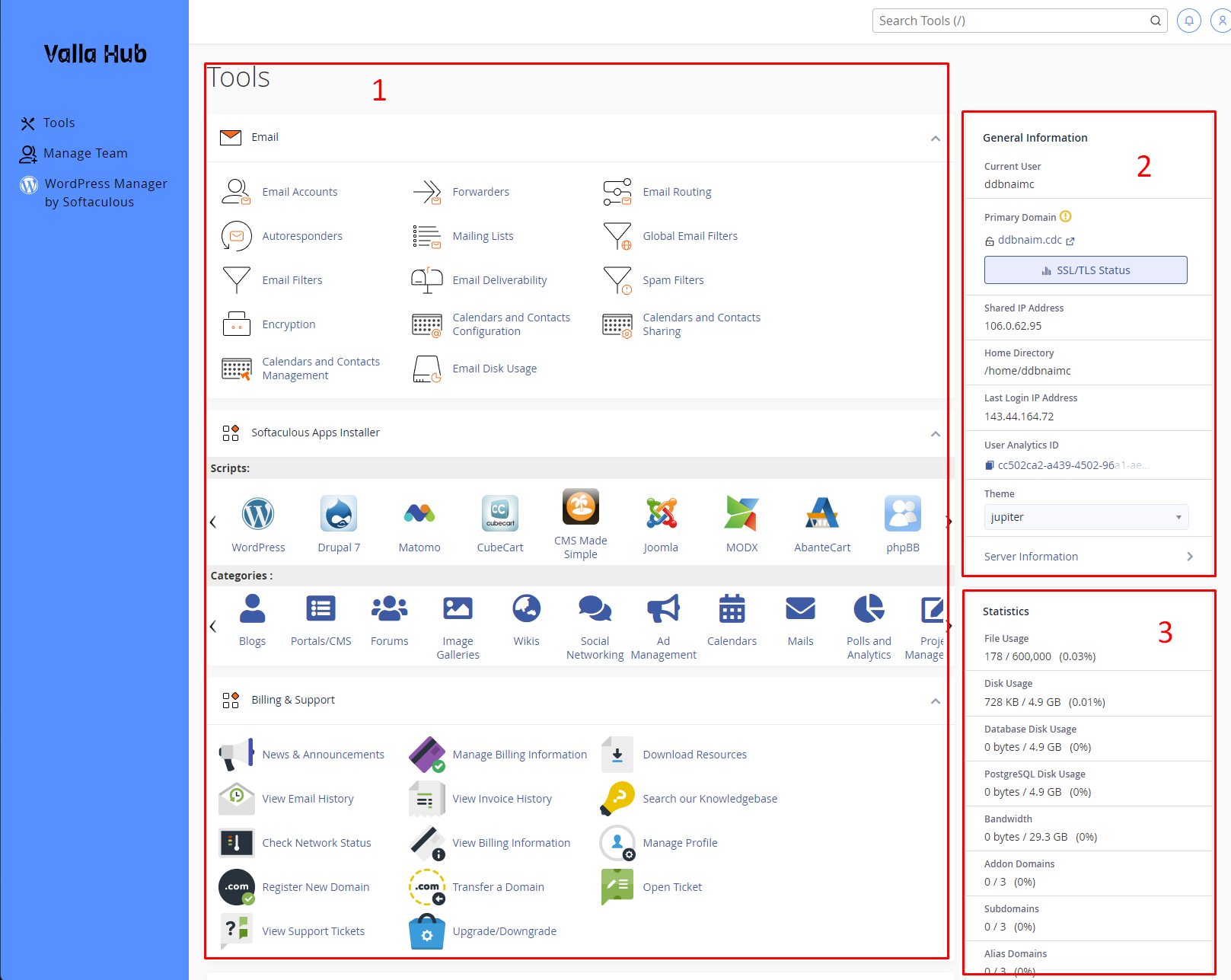
You’ll find a variety of sections under Tools:
- Email: Manage your email accounts, forwarders, filters, and more.
- Billing & Support: Quickly access invoices, billing history, and open support tickets.
- Files: Allow you to handle all your file management. Whether you're uploading website files, creating backups, or controlling access, this section provides all the essential tools to keep your site organized and running smoothly.
- Databases: Manage databases such as MySQL or PostgreSQL.
- Domains: Control subdomains, addon domains, and parked domains.
- Metrics: Keep track of website usage statistics, bandwidth, and disk space.
- Security: Access SSL certificates, set up IP blocking, and other security tools.
- Software: Install apps like WordPress, and manage PHP or other scripts.
- Advanced: Work with cron jobs, index manager, and other advanced features.
- Preferences: Customize your cPanel theme, language, and other preferences.
General Information and Statistics.
On the right side of your cPanel interface, you’ll see two important sections:
- General Information: This area gives you quick details about your account, such as your primary domain, IP address, home directory, and server information.
- Statistics: Here, you’ll find an overview of your usage stats, including disk space, bandwidth, database usage, and other resource limits. It’s a handy way to track how much of your allocated resources you’ve used.
These sections give you a quick snapshot of your hosting account's status and are great for monitoring your resource usage at a glance.
If you ever have any questions or run into any issues, our Valla Hub support team is always here to help!