


Understanding Database Management in cPanel
Managing databases effectively is critical for the seamless operation of websites and applications. Whether you're setting up a new database or maintaining an existing one, cPanel provides a suite of tools to help you efficiently manage your databases.
In this guide, we’ll walk you through each tool available under the "Databases" section in your Valla Hub cPanel, from creating new databases to managing user privileges and remote access.
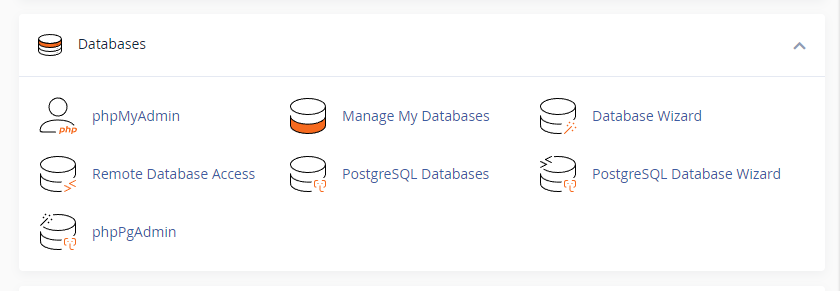
1. phpMyAdmin
phpMyAdmin is a powerful web-based tool designed for managing MySQL databases. It allows you to:
- Browse and edit database tables
- Run SQL queries
- Create or modify tables and indexes
- Export/import databases
This tool is ideal for users who prefer a graphical interface to perform database operations without writing SQL commands manually.
2. Manage My Databases
The Manage My Databases tool offers a comprehensive view of all databases linked to your hosting account. Key features include:
- Viewing, editing, and deleting databases
- Assigning or modifying user privileges
- Repairing corrupt databases
This interface is perfect for administrators who need a quick overview of their database setup.
3. Database Wizard
The Database Wizard simplifies the process of creating a new database. The step-by-step guide helps you:
- Create a new MySQL database
- Assign a user to the database
- Set up user permissions
If you are new to databases or want a hassle-free setup process, this is the tool to use.
4. Remote Database Access
Remote Database Access allows you to grant external servers access to your databases. With this tool, you can:
- Add IP addresses for remote access
- Manage and remove remote access permissions
This feature is ideal for developers or external applications that need to connect to your database from a different server.
5. PostgreSQL Databases and Database Wizard
If you prefer PostgreSQL over MySQL, the PostgreSQL Databases and PostgreSQL Database Wizard offer similar functionality:
- Create and manage PostgreSQL databases
- Assign user privileges
- Set up new databases with a user-friendly wizard
These tools ensure flexibility for users working with PostgreSQL databases.
6. phpPgAdmin
Like phpMyAdmin, phpPgAdmin provides a graphical interface for managing PostgreSQL databases. With this tool, you can:
- Browse tables and indexes
- Execute SQL queries
- Export and import PostgreSQL databases
For those managing complex PostgreSQL databases, phpPgAdmin simplifies many routine tasks.
Managing your databases through cPanel is straightforward and efficient, whether you’re dealing with MySQL or PostgreSQL. With intuitive tools like phpMyAdmin, Database Wizard, and Remote Database Access, Valla Hub ensures that your data management needs are met with ease.
Should you require any further assistance, our support team is always available to help guide you through any challenges you might face.